Mechatronics
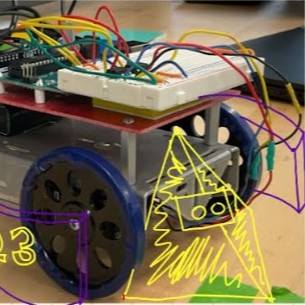
The capstone of all the circuitry-building and coding assignments within the Mechatronics class was a Robot Competition where teams of 3 all built their own robots following a schedule of Milestones for when their robot should be able to perform actions they would need to during the competition.
Cube Craze 2025
The goal of each match is to gather more cubes than your opponent’s robot by the end of a one minute period.
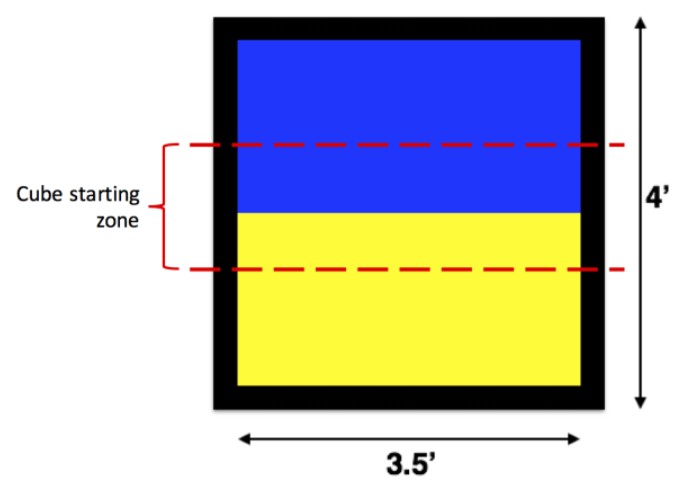
- The Cube Craze playing field is made from a 4’x4’ sheet of 3/4” plywood covered with glossy self-adhesive vinyl. It is split into two 3.5’x1.75’ colored zones (blue and yellow) with a 3” black border around the entire field. The playing cubes are 1” wooden blocks of varying color.
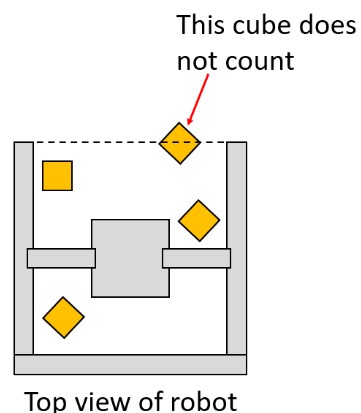
- At the beginning of each match the robot must fit inside an 8”x8” square with no height limit. However, after the match starts, the robot may extend beyond its starting configuration but at any time must fit inside an imaginary 12” diameter cylinder (no height limit). Items dropped (i.e. purposefully detached from the robot) do not need to fit inside the 12” diameter cylinder.
Provided Components:
- Color sensor (1)
- QTI sensor (1) - one additional sensor available for free (ask TAs)
- Modified servo motor for driving wheels (2)
- Positional micro servo (1)
- Continuous micro servo (1)
- Breadboard (1)
- Ultrasonic sensor (1)
- 3-wire extension (4)
- Red LED (2)
- Green LED (2)
- 9V battery cap (1)
- Robot chassis (1)
- Robot wheels (2)
- M-M 3-pin headers (5)
- Rubber band robot tires (2)
- L9110H H-bridge (2)
- 220 ohm resistor (2)
- Nylon ball & cotter pin (1)
Parts Ordering:
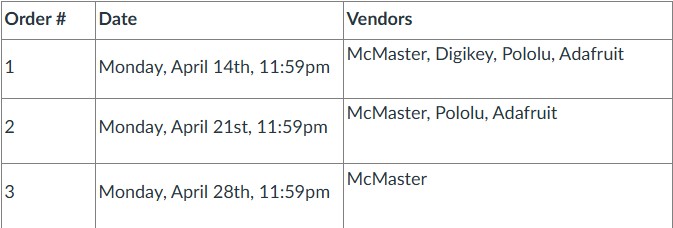
We were all given a budget of $40 and allowed to order up to the following deadlines from the corresponding vendors to obtain components for our robots.
Milestone 1: Design Pitch
5 minute presentation with an overview of the mechanical design, program flowchart, and strategy for their robot.
Design:
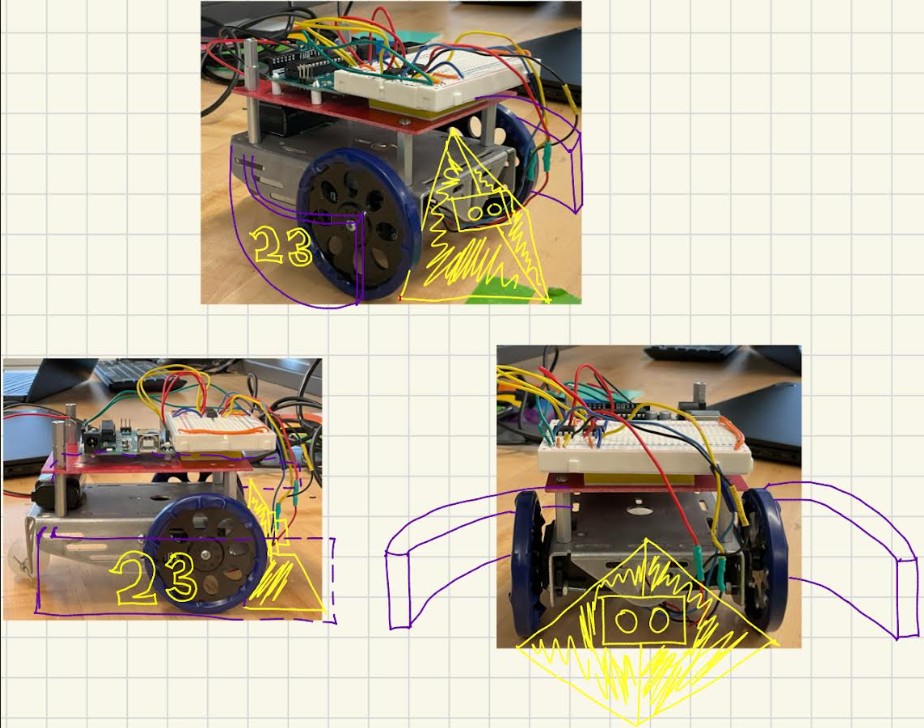
- 3D printed nose to divert blocks away from center/underneath robots.
- Curved aluminum arms which start at max allowable limit, but flop down at start when robot shakes left and right (written into ccode) unfolding to new maximum limit
Reasoning:
- Simple, less moving parts means less chance of failure
- Need to gather block quickly and maximize collection size
- Metal arms means more weight so less likely to be pushed out of the way by other robots.
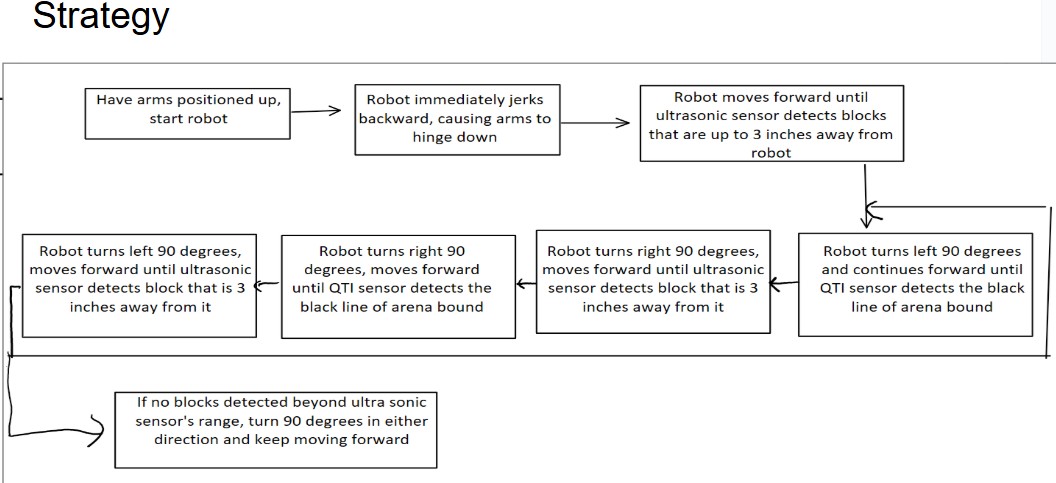
Milestone 2: Mobility
Teams must demonstrate that their robot can move forward and backward
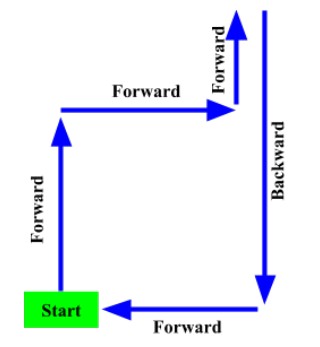 specified distances, and make both left and right turns.
Robot must:
- Drive forward 1 foot
- Turn right 90 degrees
- Drive forward 1 foot
- Turn left 90 degrees
- Drive forward 6 inches
- Drive backward 1.5 feet
- Turn left 90 degrees
-
Drive forward 1 foot, returning to the starting position
- Stop
Milestone 3: Border Sensing & Color Detection
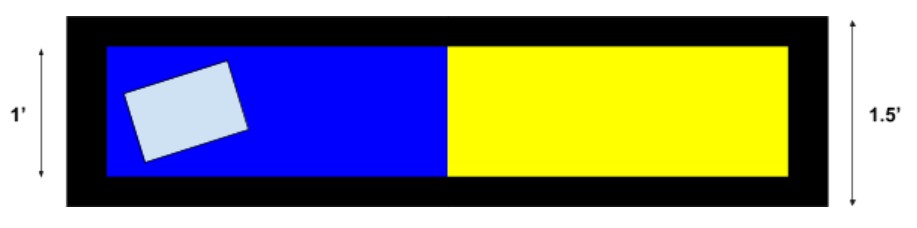 Teams must demonstrate that their robot can detect the current color of the robot’s location and the edges of the board. To accomplish this, the team’s robot must drive on a narrow a blue and yellow track, immediately stop when it hits the other color, turn 180 degrees, drive to the back of the starting color, and stop again.
The robot must remain on the board at all times. A TA will randomly choose which color the robot starts on, the orientation of the robot and how far away the robot is
from the other color. The robot must be able to independently determine which color it is on (the team will not be allowed to change code,
they know which color the robot starts on).
Teams must demonstrate that their robot can detect the current color of the robot’s location and the edges of the board. To accomplish this, the team’s robot must drive on a narrow a blue and yellow track, immediately stop when it hits the other color, turn 180 degrees, drive to the back of the starting color, and stop again.
The robot must remain on the board at all times. A TA will randomly choose which color the robot starts on, the orientation of the robot and how far away the robot is
from the other color. The robot must be able to independently determine which color it is on (the team will not be allowed to change code,
they know which color the robot starts on).
Milestone 4: Cube Clearing
Teams must demonstrate to that their robot can gather cubes. At the beginning of the milestone, there will be 10 cubes on each side of the board, randomly scattered
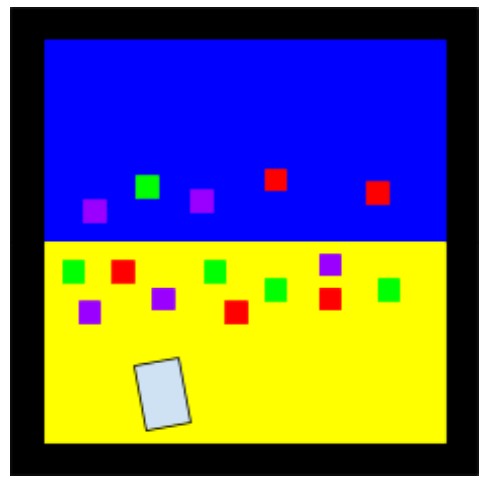 within the middle third of the field. To complete the milestone, the robot must gather at least 5 cubes within one minute. A TA will randomly choose the color therobot starts on. The robot will start centered at the back of the board (touching the black line), but the team may choose their desired starting orientation, much like the actual competition.
Team LeBot’s Performance
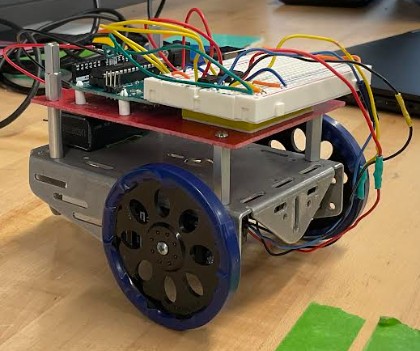
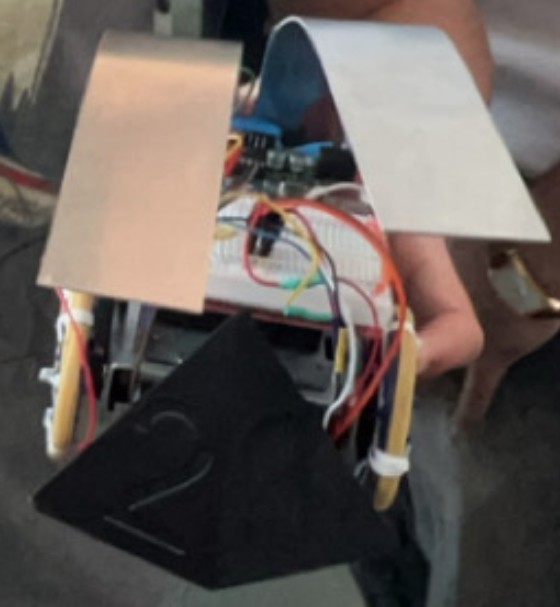 In the end we kept the arms and the nose. We altered the wheels b putting rubber bands on them and attaching twists ries at different points along them in order to give the wheels more traction so they wouldn’t spin out. There were seven groups, each with six to seven teams, and we competed in a round robin to decide which two teams from each group would go to the playoffs. The #1 team faced off against engineers from ASML who came and competed at the end. On the precipice of the playoffs we were actually pushed backwards by one of the other robots, losing our cubes and losing the match. We realized maybe we needed more weight and planned to add a rock to circumvent this issue, but we had slightly less total cubes collected between our matches and did not advance. It was interesting adjusting the robot start positions and conditions on the fly during the competition and I enjoyed the competition atmosphere. The winning student robot was wired in such a way that it quickly drained the battery, but gave them a massive boost of speed. Their strategy was to quickly sweep across the middle with
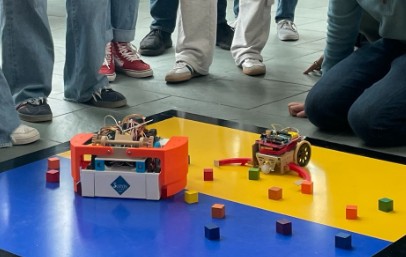 all their cubes, stop, and wait for time to run out. Still, they were no match for the ASML robot at the end.You could really see the difference in effort (and size) and how they really devoted time to making the code run well to get practically every cube.
Technologies Used: Fusion360, Arduino IDE, Google Slides
Back to Projects